
CCD Camera Edge Patrol Label Advertising Cutting Machine – Cut, Kiss Cut & Score Without Dies
A CCD camera label advertising cutting machine with edge patrol technology changes how you handle stickers, decals, tags, signs, and printed sheets. Manual trimming with scissors? Slow and inaccurate. Expensive steel-rule dies for every shape? Costly and time-consuming.
You design the shape on screen. The machine sees the printed mark with its camera. Then it cuts exactly around it. No die. No manual alignment. No wasted material from misaligned cuts.
REMEYAs edge patrol label cutter works with self-adhesive vinyl, sticker paper, cardstock, synthetic paper, PP synthetic sheets, and thin cardboard. It handles kiss cutting (cutting only the top layer), through cutting, perforation, and scoring in one pass. Sign shops, printing houses, label converters, and packaging sample rooms use this machine to move from digital artwork to finished pieces within minutes.
Its not a plotter. Its not a laser. Its a CCD‑guided oscillating‑knife cutting system that follows printed registration marks with ±0.1 mm precision.
Advertising Cutting Machine Models Overview
CCD camera edge patrol cuts stickers, labels, signs & cardstock with ±0.1mm precision. Kiss cut, through cut, score. No dies, no manual alignment.
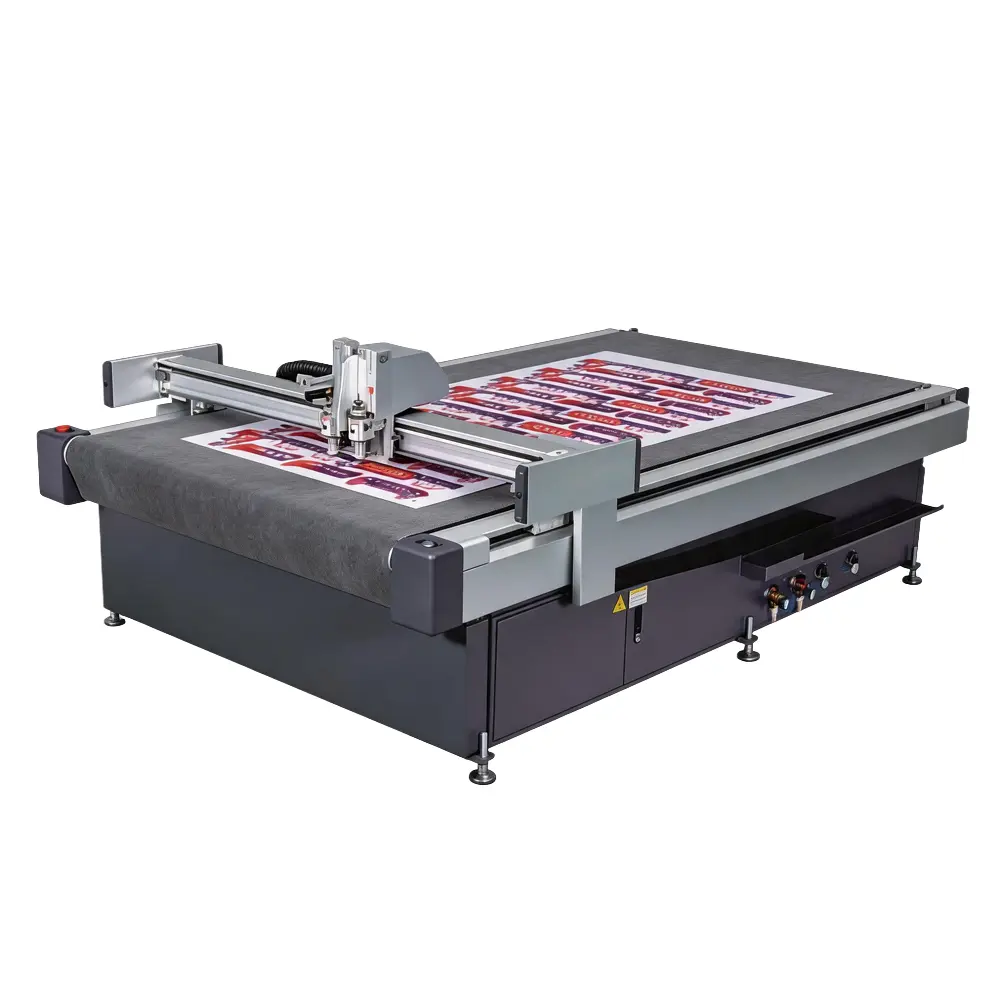
What This Advertising Cutting Machine Actually Does – A Straight Explanation
Heres the old way: You print stickers on a sheet. The printer doesnt punch registration holes, so you have to eyeball where to cut. You load the sheet into a manual cutter or use scissors. Half the time, the cut drifts off the printed edge. You waste sheets. You waste time.
Now heres what a CCD camera label dvertising cutting machine does:
You print your design with standard registration marks (little black targets) around the sheet.
Place the printed sheet on the cutting table.
The built‑in industrial CCD camera scans the sheet, finds the marks automatically.
The software calculates the exact position and rotation of every printed shape.
The oscillating knife cuts exactly around each shape. Kiss cut? Partial cut? Through cut? All from the same file.
Finished pieces peel off cleanly with no offset.
The whole thing takes seconds to set up. The machine doesnt care if the sheet was fed slightly crooked or if the printer stretched the paper a bit. The camera adjusts the cut path in real time to match what it sees.
Who actually buys this type of advertising cutting machine?
Sign shops cutting contour‑cut decals and vehicle graphics
Digital print shops producing custom sticker sheets for clients
Label converters doing short‑run, multi‑shape label orders
Packaging sample rooms cutting carton samples from pre‑printed sheets
Industrial printing operations cutting tags, hang tags, and instruction sheets
Why Shops Switch to a CCD Camera Label Advertising Cutting Machine
No More Mirroring the Cut Path in Software
Traditional plotters require you to manually outline every shape and mirror the cut path in the design software. That workflow is slow and error‑prone.
With a CCD label cutting machine, you dont need to generate a separate cut file. The camera reads the registration marks and automatically extracts the contour. One‑click contour extraction from the printed graphic – the software builds the cut path without manual tracing.
Kiss Cutting on Demand – One Pass, Two Depths
Adhesive stickers typically need kiss cutting: the blade cuts through the vinyl and adhesive but leaves the liner paper intact.
The machine handles kiss cutting and through cutting in the same run. Define which parts are kiss cut and which are cut all the way through. The blade depth changes automatically. No second pass. No recalibration between jobs.
Your Printed Sheets, Perfectly Registered
Printing on a digital press or offset printer introduces small variations. Paper stretches. The image shifts by a fraction of a millimeter. Those tiny errors ruin a conventional flatbed cut.
The CCD camera sees the actual printed image. It compares the cameras view to the design file. Then it rotates, scales, and shifts the cut path to match exactly what got printed. Even a sheet printed slightly off‑register cuts perfectly.
One Advertising Cutting Machine Does Stickers, Cardstock, Paperboard – and More
A CCD edge patrol cutter is not limited to sticker paper. The same machine processes:
| Material Type | Thickness | Application |
|---|---|---|
| Self‑adhesive vinyl (gloss/matte/clear) | 0.1–0.2 mm | Stickers, decals, product labels |
| Synthetic paper (PP, PET, YUPO) | 0.1–0.3 mm | Waterproof labels, outdoor signage |
| Cardstock / Cover stock | 200–350 gsm | Business cards, tags, greeting cards |
| Coated paper | 150–300 gsm | Photo stickers, brochure samples |
| Thin cardboard (folding carton) | Up to 1 mm | Sample cartons, small box runs |
| Thin corrugated (E‑flute / F‑flute) | Up to 1.5 mm | Lightweight packaging prototypes |
For each material, save a preset. The operator picks vinyl – the machine sets blade force, cutting speed, and kiss‑cut depth.
Faster Turnaround for Short Runs – No Die Cost
A steel‑rule die for a custom sticker shape costs 200–200–500 and takes 3–7 days. For a one‑off custom order or a small batch of 100 sheets, that die cost kills your margin.
A CCD label cutter has zero die cost. You quote the job, design the artwork, print, then cut. The entire production cycle fits into one afternoon. Rush orders become your competitive advantage, not your nightmare.
Automatic Feeding for Unattended Production
Higher‑end models include an automatic sheet feeder. Load up to 150 sheets of sticker paper. The machine pulls one sheet at a time, scans the marks, cuts, and stacks the finished pieces in the output tray. You walk away. The machine runs. When you come back, a stack of finished stickers is ready for packaging.
Where Real Customers Use This Machine
Sticker and Decal Shops
A small sticker shop that used to outsource contour cutting to a larger competitor now brings it in‑house. A CCD camera label cutting machine sits next to their digital printer. They print in the morning, cut in the afternoon, and ship the same day.
For shops producing custom die‑cut stickers for e‑commerce brands, craft businesses, and promotional products, the machine pays for itself in saved outsourcing fees within months.
Digital Printers Adding Finishing
A commercial printer with a digital press adds a CCD edge patrol cutter to offer in‑house finishing. Clients bring PDFs. The printer outputs sheets, cuts stickers, scores cardstock for greeting cards, and kiss cuts vinyl decals. No need to send finishing work to a separate trade shop.
Label Converters for Short Runs
Converters who traditionally used rotary die‑cutting for high‑volume labels now use a digital cutter for short runs, samples, and proofing. A new label design goes from artwork to finished samples in under an hour. Customer approves. The converter runs a short batch of 500 sheets on the digital cutter while the steel die is still being manufactured for the long run.
In‑House Packaging Departments
Brands that produce their own point‑of‑sale displays or seasonal packaging use the machine to cut samples and low‑volume runs from pre‑printed carton board. The CCD camera ensures that cuts follow printed graphics precisely – essential when the design wraps around box edges or requires exact alignment on a retail display.
Educational and Craft Environments
Schools, maker spaces, and small craft businesses use desktop‑size CCD label cutters for custom greeting cards, student projects, and one‑off sticker production. The software is simple enough for beginners, but the precision meets professional standards.
How the CCD Camera System Works – Without the Jargon
The naming can get confusing. Edge patrol. CCD registration. Mark point detection. Visual positioning. What does it all mean?
The machine has an industrial camera mounted above the cutting table. When you load a printed sheet, the camera takes a photo. The software looks for the registration marks you printed around your artwork – usually small black circles or crosshairs.
Two‑point registration – Works for most jobs where the printed design is not severely distorted.
Four‑point registration – Handles sheets that are noticeably skewed or stretched. The software calculates a perspective correction to fit the cut path exactly.
Contour extraction – If the printed artwork has no registration marks, the software can detect the actual outline of the printed shape and generate the cut path automatically. Works best when the shape contrasts well with the background.
The machine then aligns the cut path, adjusting for rotation, shift, and scaling. The blade moves along the corrected path. If the machine supports real‑time edge tracking, the camera keeps watching during cutting and makes micro‑adjustments on the fly.
Result: cuts that line up with printed graphics every time.
Advertising Cutting Machine Tools and Functions
Drag Knife – For Kiss Cutting Stickers
A fixed blade that the machine drags through the material. Blade depth is adjustable. For kiss cutting, the blade penetrates the face stock but stops above the liner. The operator peels away the excess material around each sticker. The stickers stay on the liner, ready for application.
For through cutting, the blade goes all the way through the material. Separate cutouts drop out.
Oscillating Knife – For Thicker Cardstock and Corrugated
The blade moves up and down at high speed while cutting. This shearing action cuts through heavy cardstock and thin corrugated without crushing the material fibers. Used when the machine handles packaging samples alongside sticker cutting.
Perforation Tool / Creasing Wheel
Perforation cuts create tear‑away sections – useful for coupon sheets or multi‑part forms. The creasing wheel presses fold lines into cardstock for greeting cards, boxes, or brochures. Same machine, same pass.
Plotting Pen
The machine can draw instead of cut. Add fold indicators, part numbers, or assembly instructions directly onto the material. Particularly useful when the cut pieces will be handled by non‑technical staff.
Why choose REMEYA for your Advertising Cutting Machine solution?
REMEYA focuses on CNC cutting solutions for flexible materials such as leather, fabric and foam, supplying machines to automotive interiors, sofa & furniture, footwear and leather goods manufacturers in global markets.
With years of experience in digital cutting and nesting, our engineering team understands real factory challenges such as uneven hides, labor shortages and rising material costs.
Our leather cutting machines are used by manufacturers in Europe, the Middle East and Southeast Asia, and many customers report higher yield and faster delivery after upgrading from manual or die cutting.
Factory-direct supply, clear technical communication and complete training and after-sales support help you build a stable, efficient leather cutting process for the long term.
Software and Workflow
The CCD label cutting machine works with standard design tools. No proprietary software lock‑in.
Supported file formats:
DXF – most common, works with most CAD tools
AI – Adobe Illustrator files (paths only)
PDF – with proper vector paths
PLT – HPGL plotter format
BMP, JPG, PNG – for contour extraction (the software generates the cut path from the printed image)
Typical workflow for stickers:
Design the sticker in Illustrator, CorelDRAW, or any graphic tool.
Print the design on self‑adhesive paper. Make sure registration marks are included (most CC‑cut software adds them automatically).
Load the printed sheet onto the cutting table.
Open the cutters software. Import the design file (or the image file).
Click Detect Registration. The camera finds the marks. The software aligns the cut path.
Select the material preset: Vinyl Kiss Cut.
Press Start.
The machine cuts the sheet. Operator removes the waste matrix around the stickers. Finished stickers stay on the liner.
Optional automation: With an auto‑feeder, load a stack of pre‑printed sheets. The machine feeds one sheet, cuts it, ejects it, and pulls the next sheet. Up to 150 sheets per load. Hands‑off.
Common Questions About CCD Camera Label Advertising Cutting Machine
Q: What material types work best?
Self‑adhesive vinyl (gloss, matte, clear, holographic), sticker paper (coated and uncoated), synthetic paper (YUPO, PP, PET), cardstock up to 350 gsm, folding carton board up to 1 mm.
For very thin or stretchy materials, use the vacuum table option (flatbed only). For standard sticker sheets, the roller‑feed system works fine.
Q: What is the difference between registration mark detection and contour extraction?
Registration mark detection: you print small targets around your artwork. The camera finds these specific marks. Fast, reliable, and works for large sheets, small sheets, grids.
Contour extraction: no marks needed. The camera looks at the shape you printed and figures out where to cut. Works when the shape contrasts well with the background. Slower to process but useful for jobs where you cannot add registration marks (e.g., existing printed stock).
Q: Can I cut already printed product that has no registration marks?
Yes, using contour extraction. The accuracy depends on how clearly the shape stands out from the background. Solid‑color shapes on white paper work well. Complex photographic edges work less reliably.
Q: What about perforation and creasing?
Yes. The tool head supports a perforation/creasing wheel. Use it for coupon sheets (tear‑off sections), greeting cards (score lines), and carton samples (fold lines).
Q: How long does it take to set up a job?
From loading the sheet to pressing start: typically 30–60 seconds. The automatic detection takes about 2–3 seconds. Most of the time is placing the sheet correctly.
Q: What if the sheet is printed slightly crooked?
The CCD cameras registration system corrects for rotation and shift automatically. As long as the sheet is not folded or wrinkled, the cut will align with the print.
Q: Do I need special software?
The machine includes cutting software that works with files from Illustrator, CorelDRAW, Photoshop (via plug‑in), and most CAD tools. Plug‑ins are available for direct export from design software.
Q: What is the cutting accuracy?
±0.1 mm positioning accuracy. Repeatability within ±0.08 mm. For reference, a human hair is about 0.07 mm thick.
Q: Can the machine cut through the liner for individual stickers?
Yes. Through cut mode cuts the sticker and the liner completely. The machine can also be set to cut only the sticker and leave the liner intact (kiss cut).
Q: How does the machine handle glossy or dark materials?
The camera uses adjustable lighting (LED ring or coaxial) to illuminate the registration marks. Glossy surfaces are fine as long as the marks are printed in a contrasting color (black on white works best). For clear materials, options include a backlight or directional light.
Q: Do I need a separate plotter and a separate sticker cutter?
No. This machine replaces both a vinyl cutter and a flatbed cutter for sticker‑sized work.
About REMEYA – CCD Camera Advertising Cutting Machine Solutions
REMEYA designs and manufactures CCD vision‑guided cutting systems for the sign, print, label, and packaging industries. Our products include flatbed cutters, roller‑fed cutters, and combination machines that integrate oscillating knife, drag knife, creasing, and marking tools.
We do not rebrand generic equipment. Each machine is built with industrial‑grade components: Japanese or German linear guides, high‑resolution CCD cameras, fast servo motors, and welded steel frames for stability.
Factory direct support applies to all customers. Spare parts ship from our warehouse. Application engineers are available for workflow integration advice.
Our customers include digital print shops, commercial sticker manufacturers, packaging sample rooms, and industrial printing plants. Many acquired their first CCD edge patrol label cutter for short‑run sticker work, then expanded to cardstock cutting, carton sampling, and custom packaging as they saw the flexibility of the platform.
Next Steps – Tell Us What You Cut
Let us understand your work:
What materials do you cut most? (sticker paper, vinyl, cardstock, labels, cardboard, other)
Do you produce kiss cut stickers only, or do you also need through cutting and creasing?
Are your sheets pre‑printed with registration marks, or do you need contour extraction without marks?
What is your typical sheet size? A3, A4, 12×18, custom?
Do you need automatic sheet feeding for unattended production?
We will recommend a CCD camera Advertising Cutting Machine model and configuration based on your actual production volume – not a generic recommendation.
Contact REMEYA through the website or call your regional sales representative. Tell them you need a advertising cutting machine with camera registration for real shop floor production.